What is Polaris?
A Versatile Tool for Chromatin Loop Annotation

The name Polaris reflects its role as the “North Star” in the analysis of chromatin loops. In this analogy, chromatin loops represent Polaris, the central focus, while the surrounding structural patterns—such as architectural stripes, TAD boundaries, and co-occurring loops—act as guiding constellations like the Big Dipper and Cassiopeia. Polaris identifies chromatin loops by capturing and interpreting these structural cues, akin to navigating the night sky by observing constellations.
- Polaris detects chromatin loops by combining axial attention and a U-Net backbone to capture local and global structural features, including:
Co-occurring loops.
Architectural stripes.
TAD boundaries.
Polaris uses knowledge distillation to address limited training labels, ensuring robust performance without extensive fine-tuning.
Polaris outperforms existing tools in accuracy while being computationally efficient for large-scale analyses.
Polaris works seamlessly with both single-cell and bulk data across various assays, sequencing depths, and resolutions.
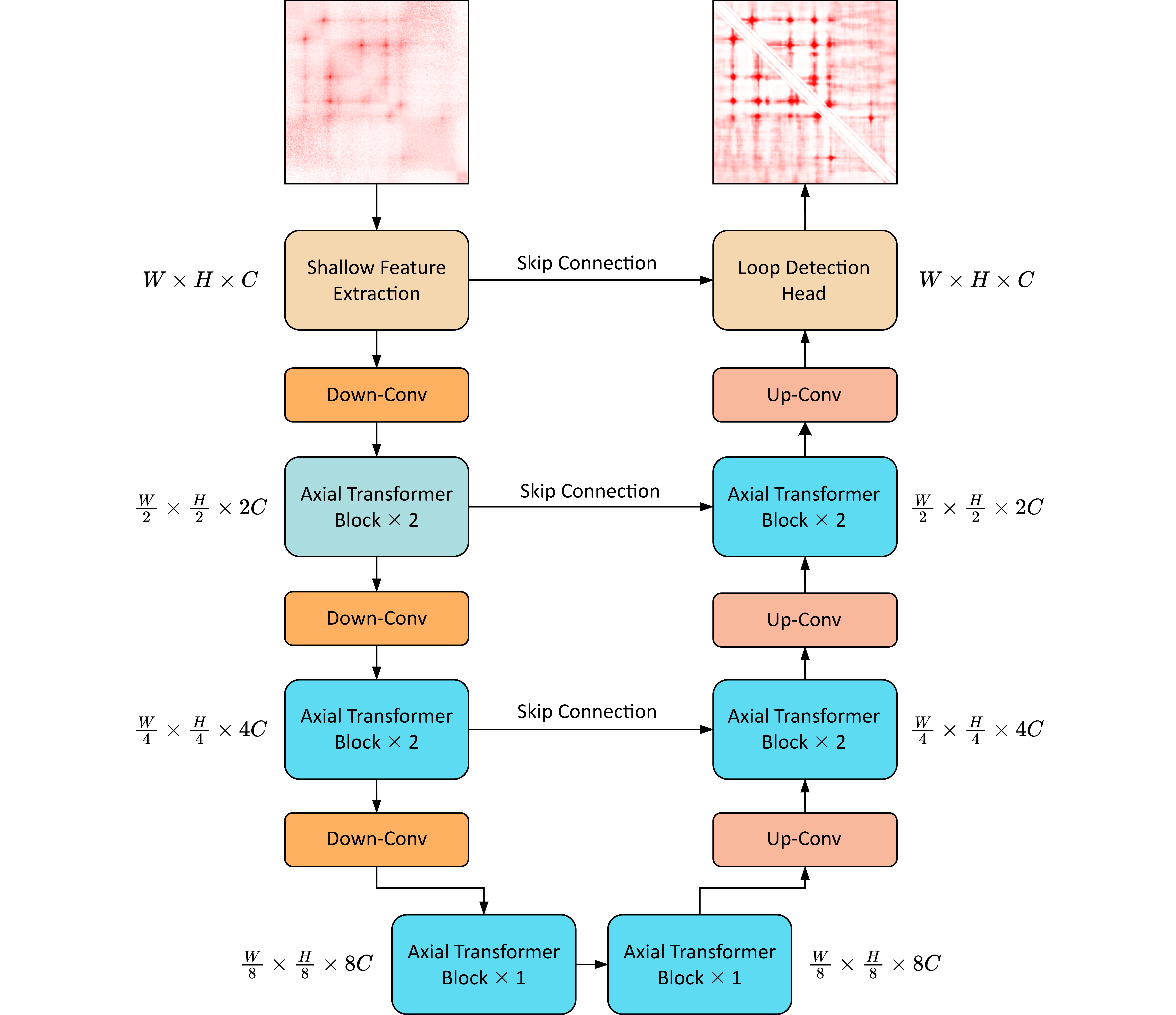
Overview of the Polaris neural network for loop scoring.
Polaris Usage
Input files
Polaris requires a .mcool file as input. You can obtain .mcool files in the following ways:
Download from the 4DN Database
Visit the 4DN Data Portal.
Search for and download .mcool files suitable for your study.
Convert Files Using cooler
If you have data in formats such as .pairs or .cool, you can convert them to .mcool format using the Python library cooler. Follow these steps:
Install cooler
Ensure you have installed cooler using the following command:
pip install cooler
Convert .pairs to .cool
If you are starting with a .pairs file (e.g., normalized contact data with columns for chrom1, pos1, chrom2, pos2), use this command to create a .cool file:
cooler cload pairs --assembly <genome_version> -c1 chrom1 -p1 pos1 -c2 chrom2 -p2 pos2 <pairs_file> <resolution>.cool
Replace
<genome_version>with the appropriate genome assembly (e.g., hg38) and<resolution>with the desired bin size in base pairs.Generate a Multiresolution .mcool File
To convert a single-resolution .cool file into a multiresolution .mcool file, use the following command:
cooler zoomify <input.cool>
The resulting .mcool file can be directly used as input for Polaris.
polaris loop
Polaris provides two methods to generate loop annotations for input .mcool file. Both methods ultimately yield consistent loop results. Below is a detailed explanation of each method:
Method 1: polaris loop pred
This is the simplest approach, allowing you to directly predict loops in a single step:
polaris loop pred -i [input.mcool] -o [save_path.bedpe] [options]
Key Options:
-i, --input: Path to a.mcoolcontact map file.-o, --output: Path to the.bedpefile where the predicted loops will be saved.-c, --chrom: Specifies the chromosomes for loop calling, provided as a comma-separated string.-b, --batchsize: Defines the batch size used for prediction. Adjust based on available computational resources.-r, --resol: Resolution of the input contact map.
This command processes the input .mcool file and outputs the identified chromatin loops directly.
Method 2: polaris loop score and polaris loop pool
This method involves two steps: generating loop scores for each pixel in the contact map and clustering these scores to call loops.
Step 1: Generate Loop Scores
Run the following command to calculate the loop score for each pixel in the input contact map:
polaris loop score -i [input.mcool] -o [loopscore.bedpe] [options]
Key Options:
-i, --input: Path to a.mcoolcontact map file.-o, --output: Path to the.bedpefile where the loop scores will be saved.-c, --chrom: Specifies the chromosomes for loop calling, provided as a comma-separated string.-b, --batchsize: Defines the batch size used for prediction. Adjust based on available computational resources.-r, --resol: Resolution of the input contact map.
Step 2: Call Loops from Loop Candidates
Use the generated loop score file to identify loops by clustering:
polaris loop pool -i [loopscore.bedpe] -o [loops.bedpe] [options]
Key Options:
-i, --input: Path to the input loop candidates file.-o, --output: Path to the.bedpefile where the final loops will be saved.-r, --resol: Resolution of the input file.
⭐**Little function for very large, high coverage, and hight resolution mcool file**
For very large file, the above methods may cause out of memory problem.
Therefore, we provide a Function that under Development polaris loop scorelf for large file.
You can run the code below for more information: .. code-block:: bash
polaris loop scorelf –help
To annotate loops from contact map, you can run the code below: .. code-block:: bash
polaris loop scorelf -i [input.mcool] -o [loopscore.bedpe] [options] polaris loop pool -i [loopscore.bedpe] -o [loops.bedpe] [options]
polaris util
The polaris util command provides various utilities for working with Hi-C data. Below is a detailed explanation of each utility and its options.
polaris util cool2bcool
The cool2bcool utility converts a .mcool file to a .bcool file. The .bcool file is compatible with .mcool files and requires less storage space.
polaris util cool2bcool [OPTIONS] MCOOL BCOOL
Key Arguments:
MCOOL: Path to the input.mcoolfile.BCOOL: Path of the.bcoolfile to save.
polaris util pileup
The pileup utility generates 2D pileup contact maps around given foci.
polaris util pileup [OPTIONS] FOCI MCOOL
Key Arguments:
FOCI: Path to the.bedpefile in the same format as Polaris output, containing loop loci.MCOOL: Path to the input.mcoolfile.
polaris util depth
The depth utility provides a very efficient way to calculate the coverage of a cool file.
polaris util depth [OPTIONS] -i MCOOL -r RESOL
Key Arguments:
MCOOL: Path to the input.mcoolfile.RESOL: Resolution.
Contact
A GitHub issue is preferable for all problems related to using Polaris.
For other concerns, please email Yusen Hou (yhou925@connect.hkust-gz.edu.cn).